
Step 3
Project Template
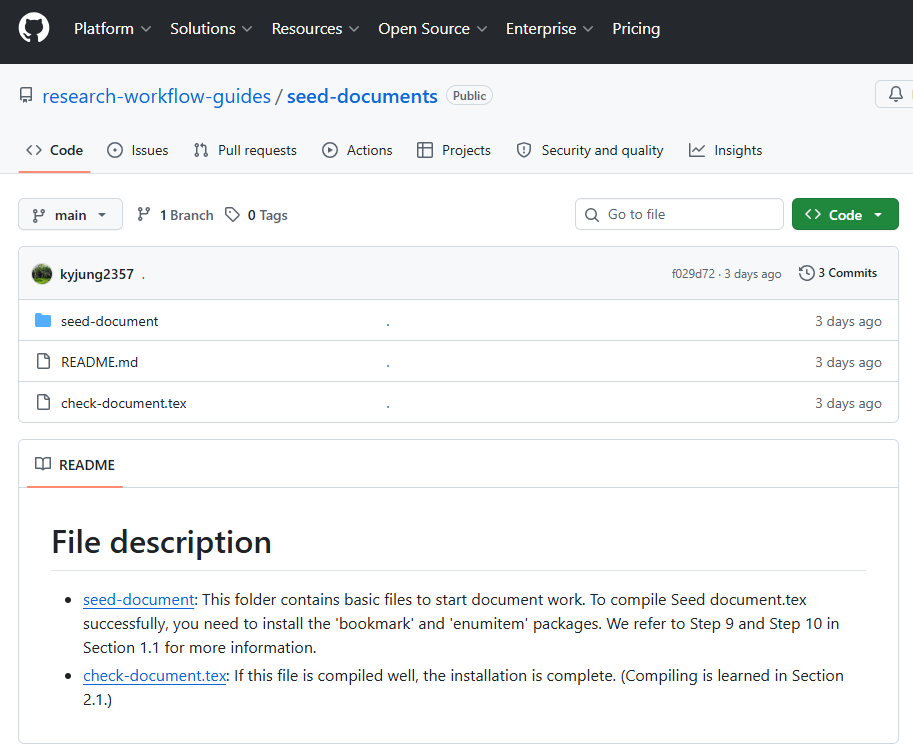
Download the seed-documents starter project as a ZIP file from GitHub and extract it. Open the extracted folder in VS Code and run the first PDF build.
Download the template
- Above the repository's file list, click Code, then select Download ZIP.

- In File Explorer, right-click the downloaded ZIP file and select Extract All. Confirm that the extracted folder contains
check-document.texand theseed-documentfolder.
Run the first PDF build
- In VS Code, select File > Open Folder… and open the extracted top-level folder that contains
check-document.tex. - Open
check-document.texin Explorer. PressCtrl+Shift+Pto open the Command Palette, then search for and runBuild LaTeX project. If MiKTeX prompts you to install a missing package, complete the installation before checking the build result. - When the build finishes, confirm that
check-document.pdfwas created. RunView LaTeX PDF filefrom the Command Palette and check that the PDF opens in the VS Code preview.